


How to Use Farm Mode in iSandBOX for Education
July 1, 2026
July 5, 2026 at 03:48 PM
Discover how Farm mode in iSandBOX by UTS helps schools and kindergartens teach children about animals, farming, habitats, nature, and responsibility through interactive hands-on learning.

How to Use Farm Mode in iSandBOX for Education
Teaching children about animals, farming, nature, and rural life becomes more effective when they can explore these topics through direct interaction. In a traditional classroom, children usually learn about farms from pictures, books, worksheets, or short videos. They can see a farm, but they cannot build it, change it, or experiment with it.
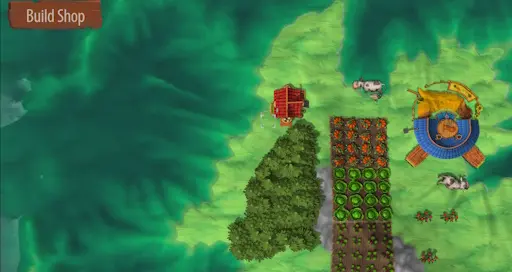
Farm mode in iSandBOX by UTS turns this topic into an interactive hands-on learning experience. Children work with real sand and digital projection at the same time. They can create their own farm environment, arrange buildings, place garden beds, add woods, and settle animals in different areas.
Instead of only listening to an explanation, children become active participants in the learning process.
What Is Farm Mode in iSandBOX?
Farm mode is an interactive farm simulation game designed to educate children through play. The sandbox becomes a digital farm landscape where children can explore domestic and wild animals, learn about their habitats, and understand how different parts of a farm environment can be organized.
The mode includes a scene editor that allows children to create their own farm. They can arrange farm buildings, garden beds, wooded areas, and animals. This makes the activity flexible for different age groups and different educational tasks.
For schools and kindergartens, Farm mode can be used as part of lessons about nature, animals, agriculture, ecology, and everyday life.
Learning About Domestic and Wild Animals
One of the key educational uses of Farm mode is helping children distinguish between domestic and wild animals.
Children can observe where different animals live, discuss how they behave, and compare their needs. Teachers can guide the activity with simple questions:
Which animals live on a farm?
Which animals usually live in the forest?
What do animals need to survive?
Why do some animals live close to people while others live in nature?This turns a simple animal topic into an interactive discussion. Children do not just memorize names. They connect animals with their environments and daily life.
Understanding Habitats and Nature
Farm mode also helps children understand the idea of habitats. A farm is not only a place with animals. It includes fields, gardens, trees, buildings, open areas, and natural zones.
By building their own farm landscape, children can see how different areas serve different purposes. Garden beds are used for plants. Buildings support farm life. Woods can become a home for wild animals. Open areas can be used for domestic animals.
This helps children understand that living things depend on their surroundings. It also introduces basic environmental thinking in a simple and age-appropriate way.
Learning Through Construction and Creativity
Farm mode is not a passive demonstration. Children can create their own farm layout and make decisions about where to place objects.
This supports several important learning skills:
Spatial thinking
Logical organization
Creativity
Problem-solving
Teamwork
Fine motor skills
Communication
For younger children, the activity can be simple: place animals, recognize objects, name colors, and describe what they see. For older children, the task can become more structured: design a farm, explain the layout, compare animal habitats, or create a story about life on the farm.
Farm Mode for Kindergartens
In kindergartens, Farm mode can be used for early childhood development activities. Children can learn animal names, compare sizes, talk about plants, and understand the difference between farm and forest environments.
The activity is especially useful because it combines movement, touch, visual perception, and conversation. Children shape the sand, watch the projected world react, and discuss what they are creating.
This format works well for short group activities, thematic lessons, and play-based learning sessions.
Farm Mode for Schools
In schools, Farm mode can support lessons in natural science, environmental studies, geography, and social studies.
Teachers can use the mode to explain:
Farm animals and wild animals
Animal habitats
Plant growing areas
Basic farming concepts
Human interaction with nature
Rural landscapes
Responsible care for animals and plants
Because the activity is visual and interactive, it helps children understand topics that may feel abstract in a textbook. Students can build, test, compare, and explain their ideas.
Why Farm Mode Works for Education
Farm mode works well in education because it connects play with clear learning outcomes. Children are more engaged when they can touch the learning environment and immediately see the result of their actions.
The mode also supports different teaching styles. It can be used for free play, guided lessons, group projects, storytelling, or thematic workshops.
For teachers, this means one interactive tool can support many classroom scenarios.
Conclusion
Farm mode in iSandBOX by UTS helps schools and kindergartens turn farm-related topics into active learning experiences. Children can build their own farm, place animals, explore habitats, arrange garden beds and woods, and learn how nature and human activity are connected.
It is a simple, visual, and engaging way to teach children about animals, plants, farming, and the environment through hands-on interaction.
For educational institutions, Farm mode is not just a game. It is an interactive learning tool that helps children understand the world around them through play, creativity, and exploration.