


Lite Controller V2: Managing Interactive Attractions in Family Entertainment Centers
October 12, 2026
October 12, 2026 at 10:05 AM
Discover how Lite Controller V2 brings device access, game selection, application management and settings into one interface for family entertainment center teams.

Lite Controller V2: Smarter Management of Interactive Attractions for Family Entertainment Centers
Discover how the new Lite Controller V2 from UTS Play helps family entertainment centers manage interactive attractions, switch between games, control devices remotely and simplify daily operations.
Managing Interactive Attractions Should Be Simple
Running a family entertainment center involves much more than providing exciting activities for children. Behind every interactive game and attraction, there are operational tasks: preparing equipment, selecting games, adjusting settings, updating applications and ensuring everything is ready for the next group of visitors.
As entertainment centers introduce more interactive experiences, managing multiple devices can become increasingly complex.
UTS Play introduces Lite Controller V2, an updated management application designed to bring devices, games and settings together in one convenient interface.
With a modern, touch-friendly design, cloud connectivity, attraction presets and application management, Lite Controller V2 gives entertainment center operators more control over their interactive equipment.
One Interface for Managing Multiple Interactive Devices
In a busy family entertainment center, staff may need to operate several attractions throughout the day. Switching between devices and managing separate connections can complicate routine tasks.
Lite Controller V2 simplifies this process by bringing connected equipment into a single workspace.
After signing in to a UTSPlay account, operators can access devices linked to that account alongside previously saved local connections.
The device overview allows staff to:
View available devices and their connection status.
Mark frequently used devices as favorites.
Open the controller for a selected device.
Add local devices manually when necessary.
Instead of navigating between separate management interfaces, operators can access their equipment from one place.
For FECs operating several interactive attractions, this provides a more organized approach to everyday device management.
Remote Control Beyond the Local Network
Not every equipment management task needs to happen directly beside an attraction.
One of the important additions in Lite Controller V2 is support for cloud connections, allowing operators to access compatible devices without being connected to their local network.
The application offers three connection modes:
Auto: The controller first attempts a local connection and switches to the cloud when necessary.
Direct: The controller connects through the device's local network address.
Cloud: The controller accesses the device through the UTSPlay account.
Cloud access requires an authenticated account and a device available through the cloud.
For entertainment center operators, this flexibility can be useful when managing equipment from different areas of a venue or accessing connected devices from another location.
It also creates more convenient options for technical support and routine equipment administration.
Faster Game Selection for Different Visitors
Family entertainment centers welcome children of different ages, interests and abilities.
A game that attracts younger children may not be the best choice for an older group. During birthday parties, organized activities or regular play sessions, staff often need to switch between experiences quickly.
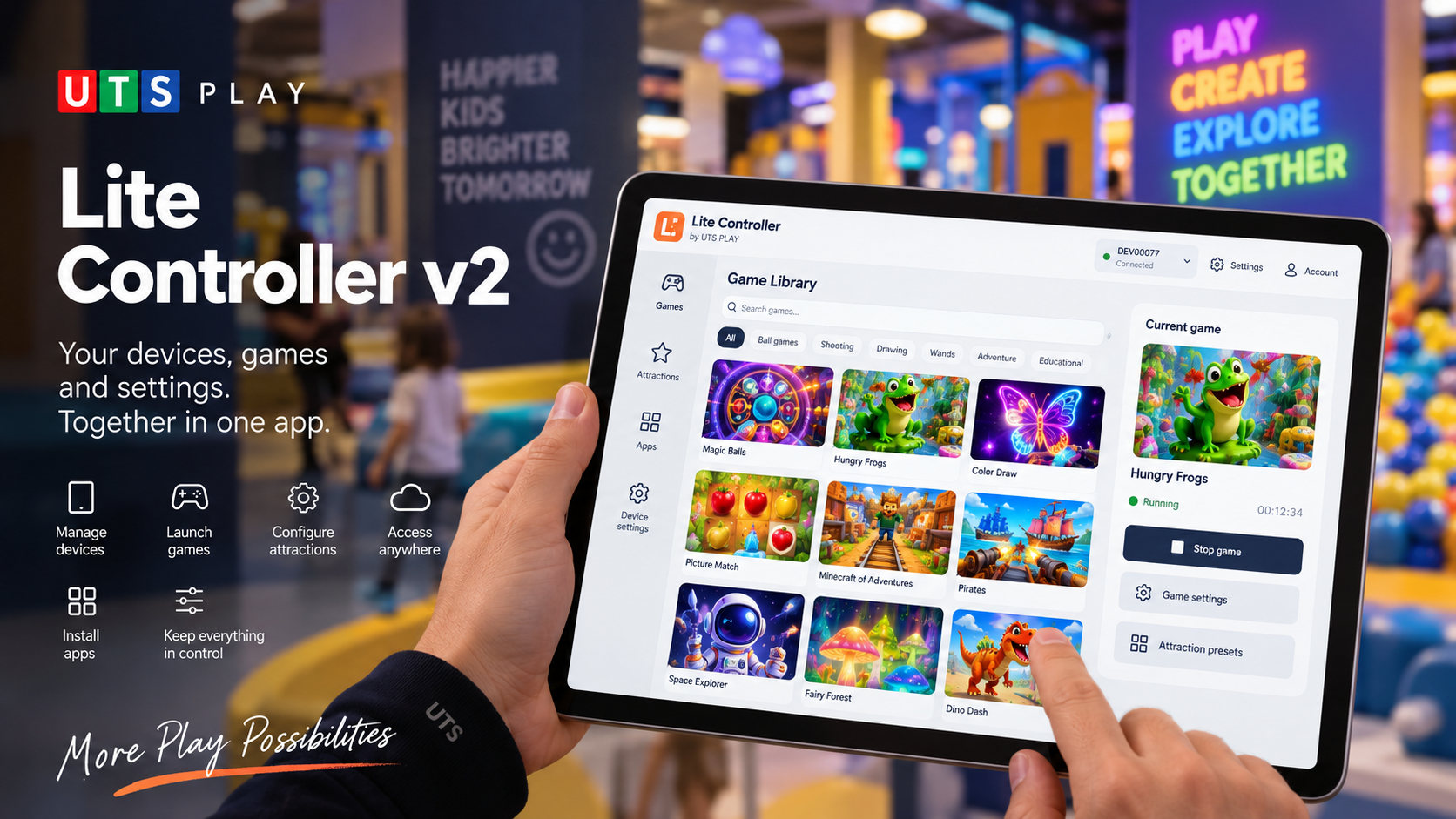
Lite Controller V2 introduces a visual game library designed for convenient navigation on tablets and phones.
Each game appears as a recognizable visual card, making it easier for operators to identify and select the next activity.
The interface includes:
Search and tags for navigating larger game libraries.
Game launching directly from the selected card.
A panel for stopping the currently running game.
Convenient access to available game settings.
This approach can help staff prepare the next activity without navigating through complicated menus.
For visitors, the benefit is a more continuous entertainment experience, with fewer interruptions between activities.
One Attraction, Different Experiences
Interactive entertainment equipment becomes more versatile when operators can adapt it to different activities.
Lite Controller V2 supports two important management functions: device configurations and attraction presets.
Device Configurations
Device configurations allow operators to change how compatible equipment operates.
Depending on the device, configurations can modify its operating state, appearance and available capabilities. They can also assign a different role to the equipment or lock it when required.
This allows the same compatible hardware to serve different operational purposes.
Attraction Presets
Attraction presets help operators select a particular interactive experience on a device.
For example, supported attractions may include:
Interactive ball games.
Shooting gallery experiences.
Living drawings.
Interactive wand activities.
Selecting a preset can filter the game library and change its visual theme to match the chosen attraction.
For a family entertainment center, this makes it easier to organize different types of play using compatible interactive equipment.
The availability of configurations and presets depends on the specific device.
Easier Application Installation and Updates
Interactive attractions rely on software as well as hardware. Keeping applications organized and up to date is an important part of equipment management.
Lite Controller V2 brings application management directly into the controller.
Operators can browse applications available to their UTSPlay account and manage supported software on compatible devices.
The application management interface allows users to:
Install new applications.
Update existing applications.
Remove supported applications.
Check installed versions.
Select available release channels.
Follow installation progress.
The available application catalog depends on account permissions and the device platform.
For entertainment center managers, having these tools in one interface can simplify software maintenance and make it easier to manage the content available on their attractions.
Device Settings and Calibration in One Place
Reliable interactive experiences depend on correctly configured equipment.
Sensors, cameras and interactive play areas may require setup or calibration to function as intended.
Lite Controller V2 provides a centralized workspace for device services and application settings.
Operators can search for specific settings, filter them by service or application, and check the status of connected services.
The controller also provides access to guided calibration for supported sensors, cameras and play areas.
This is particularly relevant for entertainment centers where equipment must be prepared for regular visitor use.
By bringing settings and calibration access together, the application helps operators handle routine technical tasks in a more structured way.
Designed for Everyday Use by FEC Staff
A management interface should be convenient not only for technical specialists but also for employees responsible for daily attraction operations.
Lite Controller V2 includes several practical features designed to support everyday use.
Tablet and smartphone compatibility. The responsive interface adapts to different screen sizes, with touch-friendly controls.
Multilingual interface. Operators can select from a range of interface languages independently of the device language.
Saved connections. Frequently used devices and local connections remain accessible.
Clear connection feedback. Staff can check device availability and reconnect after interruptions.
Account security. The application supports persistent sign-in and two-factor authentication.
Responsive game controls. Available game parameters can be applied when selected or when a value adjustment is completed.
Together, these features make Lite Controller V2 more convenient for staff working with interactive attractions throughout the day.
A Typical Day with Lite Controller V2
Consider a family entertainment center offering several interactive activities for children.
Before opening, an operator accesses the controller, checks the available devices and selects the attraction that needs to be prepared.
The operator chooses the appropriate configuration or attraction preset, opens the game library and launches the first activity.
Later, a birthday group arrives. The staff member selects another game suited to the planned entertainment program and adjusts the available settings.
If a supported application needs updating, the operator can access application management from the same controller.
When equipment requires adjustment, device settings and calibration tools are available in the centralized workspace.
This example illustrates how Lite Controller V2 can bring several routine operational tasks into one workflow.
Instead of treating game selection, software management and equipment configuration as completely separate activities, staff can manage them through a common interface.
Why Better Equipment Management Matters for Family Entertainment Centers
For family entertainment centers, the quality of the visitor experience depends partly on how efficiently attractions operate behind the scenes.
Children want engaging games and exciting activities. Parents expect a well-organized environment. Staff need tools that help them manage equipment without unnecessary complexity.
Lite Controller V2 addresses these operational needs by providing:
More convenient attraction management: Access connected devices and their controls from one interface.
Greater flexibility: Switch between supported attraction presets and game experiences.
Simpler content management: Install and update compatible applications.
More accessible technical controls: Manage device settings, services and calibration.
Flexible connectivity: Choose between local and cloud access for supported devices.
These capabilities can help entertainment centers make better use of their interactive equipment and organize daily operations more efficiently.
Bringing the UTS Play Experience Together
Interactive entertainment is not only about the games children see on the screen or play area. It also depends on the tools that allow operators to prepare, control and maintain those experiences.
With Lite Controller V2, UTS Play brings device connections, game selection, attraction configurations, application management and settings into one modern application.
For family entertainment centers looking to simplify the management of interactive attractions, the new controller offers a more convenient way to operate compatible UTS Play equipment.
Explore UTS Play interactive solutions and discover how Lite Controller V2 can support your entertainment center.