


Shark Mode in iSandBOX for Schools & Kindergartens
August 13, 2026
August 30, 2026 at 12:21 PM
Discover how Shark mode in iSandBOX helps schools and kindergartens teach children about marine ecosystems, predators, sea life, and animal behavior through interactive learning.

Shark Mode in iSandBOX for Schools and Kindergartens
Discover how Shark mode in iSandBOX helps schools and kindergartens introduce children to marine ecosystems, animal behavior, predator-prey relationships, and ocean exploration through interactive learning.
The underwater world is a natural source of curiosity for children. Fish, sharks, coral reefs, mysterious plants, and sunken ships can become an engaging starting point for lessons about marine life, ecosystems, animal behavior, and the importance of observing changes in the environment.
With Shark mode in iSandBOX, these topics become part of an interactive learning experience. Children do not simply look at pictures of the ocean or watch a video. They explore a projected underwater environment directly in the sandbox, observe sea creatures, discover different elements of the marine landscape, and react to events taking place around them.
For schools, preschools, and kindergartens, Shark mode can be used as a visual and interactive addition to lessons about nature, oceans, animals, and environmental relationships.
Explore an Interactive Underwater World
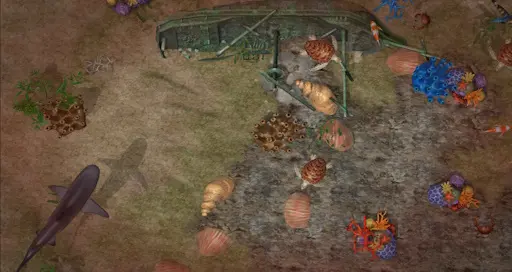
In Shark mode, the sandbox is transformed into an underwater environment filled with marine life. Children can discover exotic plants, different sea creatures, and the remains of a sunken ship while exploring the projected scene.
The environment encourages observation and discovery. Teachers can use different elements appearing in the sandbox as prompts for discussion:
What animals can we find underwater?
How are marine animals different from animals that live on land?
What might grow at the bottom of the ocean?
Why do animals need different habitats?
What could happen to a ship after spending many years underwater?
Instead of presenting marine life as an abstract topic, the sandbox gives children a visual environment they can investigate together.
Learn About Predators and Animal Behavior
One of the central elements of Shark mode is the shark itself.
When the shark approaches a location, the area is highlighted with red borders, signaling danger. Small fish react by swimming away from the predator.
This simple interaction can help teachers introduce the concept of predator-prey relationships in an age-appropriate way.
Children can observe that animals respond to danger and discuss why these reactions are important for survival. Teachers can expand the activity with questions such as:
Why are the fish swimming away?
What is a predator?
How do animals recognize danger?
What other predators live in the ocean?
How might smaller animals protect themselves?
For younger children, the activity can focus simply on identifying animals and describing what they see. Older students can use the same interaction as a starting point for discussing food chains, adaptation, and marine ecosystems.
See Cause and Effect in Real Time
Shark mode also introduces a clear cause-and-effect interaction.
When the shark enters an area and scares away the fish, children can interact with it directly. Slapping the shark with a hand three times makes it leave the location, allowing the other sea creatures to return to a calmer environment.
The immediate response helps children understand that their actions can change what happens in the digital environment.
This type of interaction can support early learning concepts such as:
Cause and effect. Children perform an action and immediately observe the result.
Counting. Younger learners can count the three interactions required to scare the shark away.
Following instructions. Children need to understand and complete a simple sequence of actions.
Observation. Students can compare what happens before, during, and after the shark appears.
These mechanics make the mode particularly suitable for short guided activities in preschool and primary education.
Introduce Marine Ecosystems Through Play
Shark mode can also become a starting point for a broader discussion about how marine ecosystems work.
Teachers can explain that the ocean is not simply a collection of individual animals. Different organisms share the same habitat and interact with each other.
Using the sandbox, children can identify:
predators and smaller marine animals;
plants and other elements of underwater habitats;
different areas of the marine environment;
changes in animal behavior when a predator appears.
The activity can then continue outside the sandbox. Students might draw their own underwater ecosystem, classify marine animals, create a simple food chain, or discuss what different sea creatures need in order to survive.
In this way, the interactive experience becomes an introduction to a wider classroom topic rather than an isolated game.
Encourage Observation and Inquiry
Interactive environments are particularly useful for inquiry-based learning because children can observe something happening and then try to explain it.
Instead of immediately giving students the answer, a teacher might ask:
“Why did the fish suddenly swim away?”
“What changed when the shark appeared?”
“What do you think will happen if the shark leaves?”
“What other animals might behave in the same way?”
These questions encourage children to formulate hypotheses, describe observations, and connect what they see with their existing knowledge.
For younger students, this can be an accessible introduction to scientific thinking: observe, ask, predict, and compare.
Combine Digital Learning With Physical Interaction
iSandBOX combines projected digital content with interaction in a physical sandbox. Children remain actively involved with the environment rather than watching educational content passively on a conventional screen.
Depending on the lesson format, students can explore individually, work in small groups, or complete activities together with a teacher.
This creates opportunities to develop not only subject knowledge but also broader skills such as:
attention and visual observation;
hand-eye coordination;
communication;
turn-taking;
collaborative problem-solving;
vocabulary development.
For kindergartens and early primary classrooms, these elements can make technology-supported learning more active and accessible.
How Teachers Can Use Shark Mode in a Lesson
Shark mode can support several types of educational activities.
A teacher introducing a topic about oceans can first allow children to explore the underwater environment freely and identify what they notice. The class can then focus on the shark and observe how smaller fish react when it approaches.
Students can discuss the difference between predators and prey and consider why escaping from predators is important for survival.
For older children, the lesson can continue with a simple marine food-chain activity or a discussion about how different species depend on one another within an ecosystem.
For younger learners, teachers can focus on basic concepts such as sea animals, colors, counting, movement, danger, and safe versus unsafe situations.
The same mode can therefore be adapted to different ages and educational objectives.
Turn Ocean Exploration Into an Interactive Lesson
Shark mode in iSandBOX by UTS turns an underwater adventure into an opportunity for learning.
By observing marine animals, exploring an underwater environment, watching predator-prey interactions, and influencing events through their own actions, children can encounter biological and environmental concepts in a form that is visual, physical, and easy to understand.
For schools and kindergartens looking to combine technology with hands-on education, Shark mode provides a flexible way to introduce marine biology, ecosystems, animal behavior, observation, and cause-and-effect learning while keeping children actively involved in the lesson.